Log Tag Type
Log Tag is a value representing a log level.
Log Level
The main log level (“Tools ⇒ Options | General | Main Log”) controls what is displayed in the GUI Message Log and what is written in the files debug.txt and log.txt.
The different log levels can be seen below:
| Level | Name | Description |
|---|---|---|
| 0 | Unconditional | Displays basic information about the Dinamica EGO status. |
| 1 | Error | Displays any error occurred and all the information from the levels below this. |
| 2 | Warning | Displays warnings regarding any potential problem that may occur and all the information from the levels below this. |
| 3 | Result | Displays the result only. |
| 4 | Info | Displays progress information and all the information from the levels below this. This is the standard log level. |
| 5 | Info 2 | Displays addtional progress information and all the information from the levels below this. This is the standard log level. |
| 6 | Debug | Displays debug information and all the information from the levels below this. |
| 7 | Debug 2 | Displays additional debug information and all the information from the levels below this. |
The log files debug.txt and log.txt are typically located in the folder C:\Users\<User>\Documents\Dinamica EGO 4.
The default location above can be overridden defining an environment variable DINAMICA_LOG_PATH containing the log path.
GUI Editor
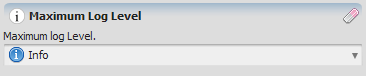
Graphical representation of the log tag editor
EGO Script
A constant representing a log tag can be defined in a EGO Script uses the following syntax:
| Value | Representation |
|---|---|
| Unconditional | .unconditional |
| Error | .error |
| Warning | .warning |
| Result | .result |
| Info | .info |
| Info 2 | .info2 |
| Debug | .debug |
| Debug 2 | .debug2 |
Automatic Conversions
- Converted from: Real Value Type, Integer Value Type, Non Negative Integer Value Type and Positive Integer Value Type.
- Converted to: Real Value Type, Integer Value Type, Non Negative Integer Value Type, Positive Integer Value Type and String Type.